 Polly3D Documentation
Generators and Booleans
Terrain, Metaballs and Cloth from the Create menu, and Boolean groups that join, cut or intersect objects.
The Create menu is one panel grouped by family: Primitives, Shapes to extrude, Generators, Boolean and Lights.
Generators#
Generators are shapes made by a formula. Like the primitives, their numbers are in the Shape tab and can be linked to a driver or a Connector.
Terrain#
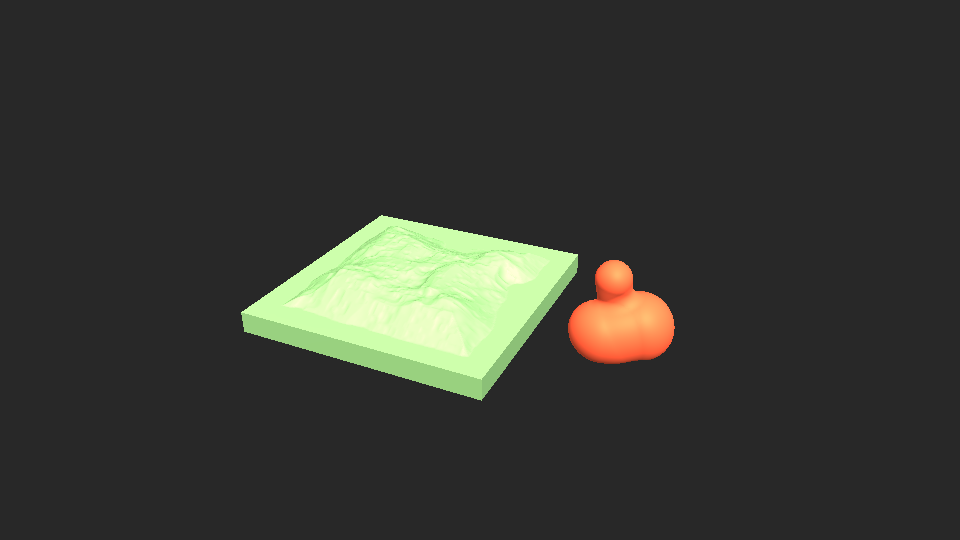
A landscape: a plane lifted by several layers of noise.
| Parameter | Meaning |
|---|---|
| Width, Depth | Size of the ground |
| Height | Height of the highest summits |
| Frequency | Size of the features: low for wide hills, high for many small ones |
| Detail (layers of noise) | 1 to 8 layers, each twice as fine as the one before |
| Roughness | How strong the fine layers are: 0 smooth, 1 jagged |
| Ridges | Folds the noise into sharp crests |
| Lowered borders | Brings the borders down to the ground: an island |
| Flat below (0 to 1) | Flattens everything under a level: lakes, a sea |
| Offset X / Z | Scrolls the landscape; link one to a driver to fly over it |
| Seed | Another landscape |
| Base thickness | Closes the sides and the underside: a block instead of a sheet |
| Subdivisions | Precision of the mesh |
Metaballs#
Balls that melt into one another where they come close.
| Parameter | Meaning |
|---|---|
| Balls | 1 to 40 |
| Ball radius, Size variation | Size of the balls and how much it differs from one to the next |
| Spread | How far the balls travel from the centre |
| Blend | How readily two balls merge |
| Motion (loops) | Moves every ball along a closed loop of its own. A whole number is one full loop: link it to a Loop A → B driver from 0 to 1 and the animation repeats without a jump |
| Seed | Another arrangement |
| Resolution | Precision of the surface (higher is slower) |
Wave and Cloth#
Wave is the rippling plane described in Primitives. Cloth adds a sheet above the ground with a Cloth effector already set: see Deformers and physics.
Booleans#
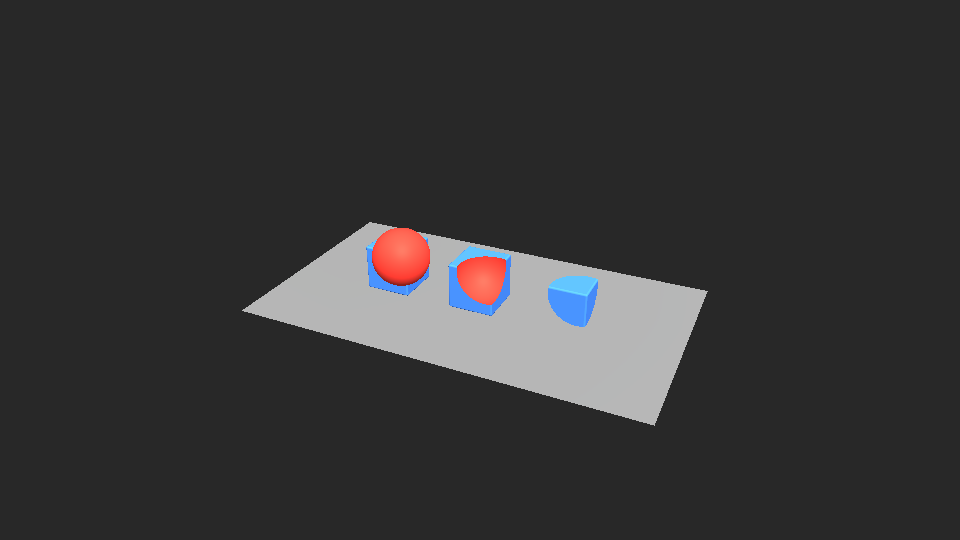
A Boolean combines objects into one shape. Select two objects or more, then choose Union, Subtract or Intersect in Create. The first object selected is the one that is cut; the others cut it.
| Operation | Result |
|---|---|
| Union | The objects become one solid |
| Subtract | The first object with the others dug out of it |
| Intersect | Only what the objects have in common |
The objects are placed in a folder named after the operation. They stay what they were: select one in the Scene panel to move it, resize it or change its material, and the result follows when you let go. The faces that are dug take the material of the object that dug them.
The folder has a Boolean tab: its switch shows the objects as they are, Operation changes the kind, and the cross removes the Boolean and keeps the folder.