 Polly3D Documentation
Cloner and effectors
Repeat an object or a group on a pattern and vary the copies with Random, Noise, Step, Delay, Image and Spline effectors.
The Cloner repeats an object (or a whole group) along a pattern without duplicating it: the copies are light, cost almost nothing and are adjustable in one gesture. Effectors then move, rotate and scale the copies by rules. Everything is in the Effectors tab of the object or group.
Adding a Cloner#
Open the Effectors tab and choose Cloner from + Add effector (or Add Cloner). A switch enables or disables it. The Base toggle keeps or hides the original object next to its copies. At most 4000 copies.
Patterns#
Choose the Pattern:
| Pattern | Parameters |
|---|---|
| Grid | Count X / Y / Z (1–100), Spacing X / Y / Z, Center |
| Linear | Count, Offset X / Y / Z (step between copies), Rotation X / Y / Z (°/copy), Scale X / Y / Z (×/copy) |
| Radial | Count, Radius, Start (°), End (°), Axis (X, Y or Z), Face outward |
| Path | Count, Offset along path, Follow path direction, and the Path object that the copies follow |
| Sphere | Count, Radius, Axis of the poles, Face outward: even distribution over a sphere |
| Spiral | Count, Spacing, Angle (°/copy) (137.5 by default: a sunflower), Rise (per copy) for a cone or a helix, Scale at the end (×), Axis, Face outward |
| Surface | Count, Seed, Distance from the surface, Follow the surface, and the Surface object the copies are spread over, evenly |
| Volume | Count, Distribution, Seed, Distance from the walls, and the Inside object that the copies fill |
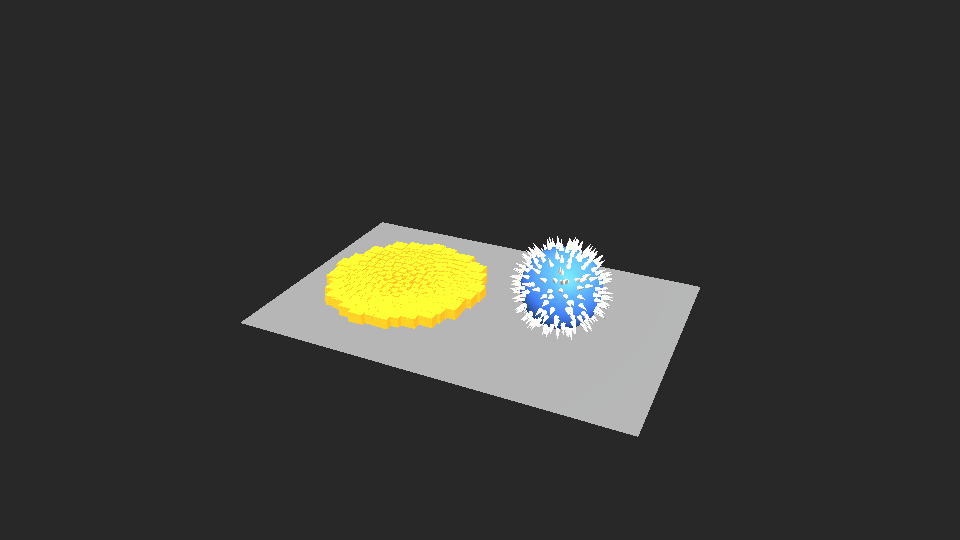
Volume fills the inside of another object, whatever its shape, as long as it is closed (a cube, a sphere, an extruded shape, an imported model without holes). Distribution is Scattered (copies thrown at random that keep away from each other, so the object fills evenly) or Grid (a regular grid that fills the object from the bottom up). Distance from the walls keeps the copies away from the skin: give it the radius of the copies so that none sticks out. The object that is filled can be hidden, and the copies follow it when it moves. To make the copies fall and stay inside, see Deformers and physics.
Lengths (spacing, radius, moves) are shown in the same units as positions and sizes: a spacing of 100 is one grid square.
Effectors#
Click + Add effector and choose a type. Effectors are applied in order (Effector order) and each has a switch and a Delete effector button.
| Effector | What it does | Specific parameters |
|---|---|---|
| Random | A random offset per copy | Seed |
| Noise | A smooth, flowing variation (animated by time) | Seed, Speed, Frequency |
| Step | A regular progression from the first to the last copy | From (0 to 1), To (0 to 1) |
| Delay | Every copy sees the clock a little later than the one before, so whatever is animated (a noise, a driver, keyframes of another effector, a Bounce, a Spring) runs through the copies like a wave | Delay per copy (s), Order (First to last, Last to first, Random, From the centre), Seed |
| Image | The brightness of a picture laid over the copies drives them: bright areas get the full effect, dark ones none | Image, Image size, Projection (From above, From the front, From the side), Invert |
| Spline | Places copies along a path | see below |
The + Add effector menu also holds Animation (Bounce, Spring), Deformers and Physics: see Deformers and physics.
All effectors except Spline and Delay share:
- Strength (−10 to 10);
- Move X / Y / Z, Rotation X / Y / Z (°), Scale — what the effector does to the copies, multiplied by the strength. There is a single Scale for the three axes: the copies grow or shrink evenly and are never stretched out of shape.
The Explode effector#
Explode cuts the mesh of the object into pieces and moves each one about its own centre: a model, an imported OBJ, a text… blown apart or opened up. It works on the geometry itself (like a deformer), so it needs no Cloner.
| Parameter | Meaning |
|---|---|
| Strength | How much of the effect applies: animate it from 0 to 1 to blow the model apart |
| Pieces | Parts: the connected parts of the model (the letters of a text, the objects of an OBJ, the parts of a pre-fractured model). Triangles: every triangle is a piece, whatever the shape (shards) |
| Size (×) | Multiplier of every piece, about its own centre (1 = unchanged, 0 = they shrink to nothing) |
| Rotation X / Y / Z (°) | Turns every piece |
| Random rotation (°) | Adds a random rotation to every piece |
| Displace, Displace X / Y / Z | Spreads the pieces away from the middle of the object in proportion to their distance from it: 1 doubles it. The axis versions work along one axis only |
| Scatter, Scatter X / Y / Z | Disperses the pieces at random, in units |
| Position noise, Noise frequency, Noise evolution | Animated noise added to the positions |
| Random seed | Another random arrangement |
A pre-fractured model gives the cleanest pieces; use Triangles for a primitive or any model that is one single part.
Falloff#
A Falloff restricts where an effector acts: None, Sphere or Linear. It has a Center, Radius / length, Softness (the soft edge) and, for Linear, an Axis X / Y / Z. Use it to make only the copies near a point wiggle, or a wave sweep through the grid.
The Spline effector#
Places the copies along a Path object, whatever the Cloner's pattern, and works without any Cloner: on a single object it simply makes the object follow the path.
| Parameter | Meaning |
|---|---|
| Strength | How much the effector applies |
| Path to follow | The Path object |
| Offset along path | Position along the path, 0 to 1 |
| Speed (% of the path per second) | Moves the copies along the path |
| Spread | Share of the path the copies cover (with one copy only the offset matters) |
| Follow path direction | Faces the copy along the path |
| Loop | Wraps around at the ends |
Clone or duplicate?#
Clone when the copies are identical or vary by a rule: a grid of cubes, a ring of columns, a rain of objects. Duplicate (⌘ D) when each object needs its own material or its own free position: a pyramid of cubes of different colors is made by duplication.
Animating a Cloner#
Every number of the Cloner and of its effectors can be linked to a driver or a Connector with the stopwatch. In After Effects, each Aux channel holds the groups Cloner, Random, Noise, Step and Spline: a model or group bound to that channel gets the matching sliders added to its cloner and effector numbers (0 keeps what the editor says).